Business Systems

Custom CRM & ERP — Stop Running Your Business on Spreadsheets

One system, one source of truth, one clear picture of your business. Built around how you actually operate — not a generic template you have to adapt to.

Custom CRM & ERP No Template Adapting Team-Ready
CRM
Analytics
ERP Database
Integrations
Automation
The Real Cost

The Real Cost of Disconnected Systems

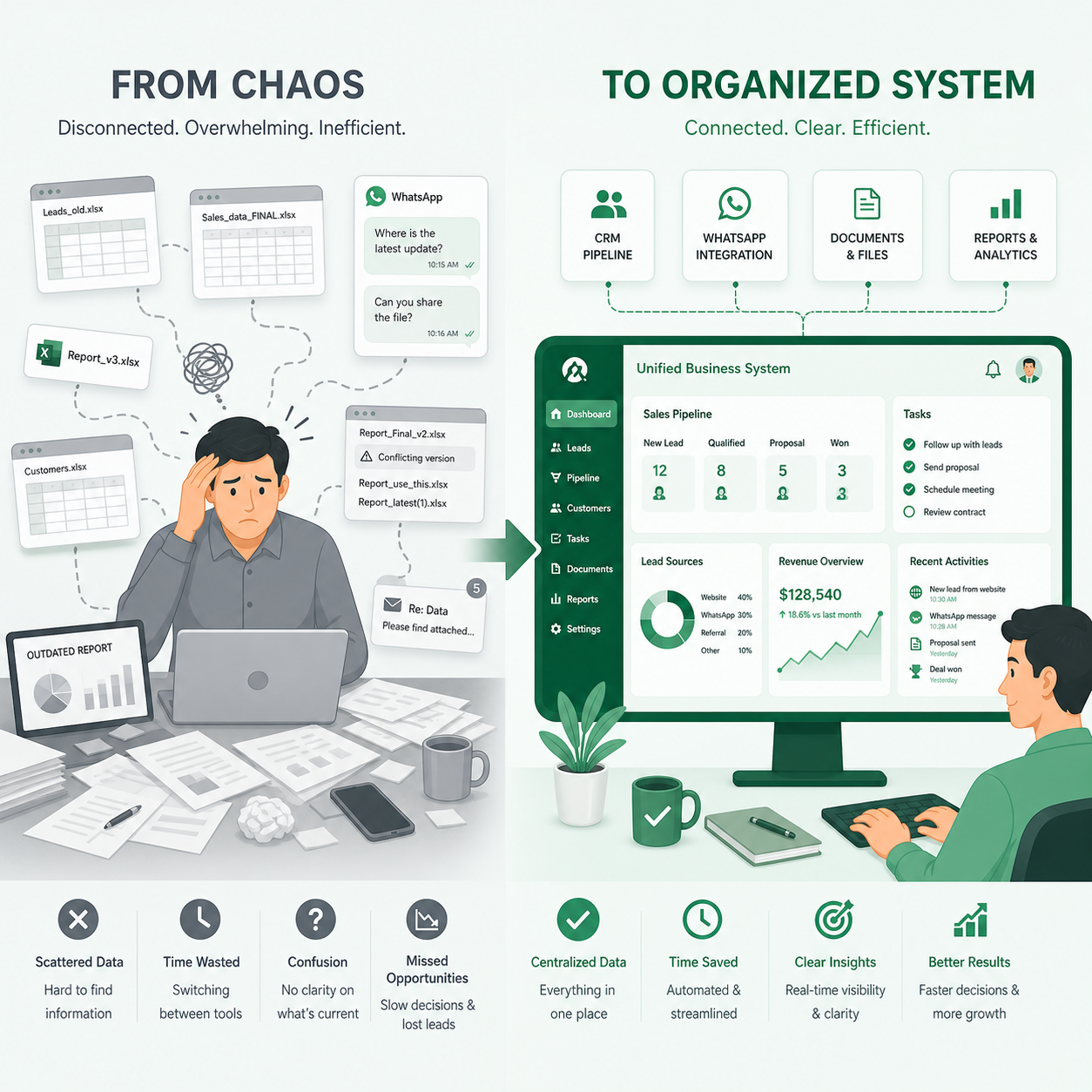
Here's what a typical growing business looks like from the inside: sales team tracking leads in a spreadsheet, operations running from WhatsApp group messages, accounts working from an Excel file that's three versions out of date, and management making decisions based on a weekly report that was accurate on Tuesday but not on Friday.

The cost isn't just inefficiency. It's errors that turn into client problems. It's decisions made on wrong data. It's the ten hours a week your team spends moving information from one system to another — time that should be going to the work that actually grows the business.

A properly built CRM or ERP system doesn't just organise your data. It changes how your business operates.
Business Systems CRM ERP
CRM

CRM — Know Every Customer. Close Every Opportunity.

A CRM — Customer Relationship Management system — is the single source of truth for your sales and customer management process. It replaces the spreadsheets, scattered notes, and missed follow-ups with a structured, searchable, automated system that manages every interaction from first enquiry to closed deal to repeat business.

01

Your Entire Sales Pipeline — Visible in Real Time

See every lead, every deal, every stage at a glance. Know which prospects are hot, which are stalling, which need a follow-up today, and what your projected revenue looks like for the next 30, 60, and 90 days — not from a gut feel, but from real data.

02

Never Lose a Lead Because Someone Forgot to Follow Up

Automated reminders, task assignments, and follow-up sequences mean your sales process runs consistently whether your team is at full strength or not. Leads don't go cold. Deals don't stall because an email wasn't sent.

03

Complete Record of Every Conversation — Never Lose Context Again

Every interaction with every client and prospect is logged and searchable. A new team member can pick up a relationship from where the last person left it. A manager can see exactly what's been discussed and agreed, without chasing updates from the sales team.

04

Built Around Your Sales Process — Not a Generic Template

We don't install HubSpot and call it a CRM implementation. We build or configure a system that maps to how your team actually sells — your stages, your fields, your qualification criteria, your workflows. The system fits your business. Not the other way around.

05

Reporting That Tells You What's Actually Happening

Conversion rates at each stage. Lead source performance. Average deal size. Sales cycle length. Individual rep performance. All of it visible, without anyone compiling a report manually.

ERP

ERP — Connect Your Business. Run Everything From One Place.

An ERP — Enterprise Resource Planning system — connects the operational functions of your business into one integrated platform. Finance, inventory, HR, procurement, and operations stop running on separate tools and start working from shared, real-time data.

Finance & Accounting — Live, Accurate, Connected

Invoicing, accounts payable, accounts receivable, expense management, and financial reporting — all connected to the rest of your operations. A sale creates an invoice automatically. A purchase order flows into accounts payable without anyone retyping it. Month-end close takes hours, not days.

Inventory & Warehouse Management

Real-time stock levels across locations. Automatic reorder triggers when stock drops below threshold. Purchase order management, goods receipt, and supplier tracking — all in one place. No more stock-outs because someone missed a reorder. No more overstock because nobody could see what was in the warehouse.

HR & Payroll — From Attendance to Payout

Employee records, leave management, attendance tracking, and payroll processing — integrated into a single system. Payroll pulls from attendance automatically. Leave balances update in real time. HR admin that used to take days happens in minutes.

Operations & Production Management

For manufacturing and production businesses: job cards, work orders, production scheduling, planning what raw materials are needed and when, and quality control — all connected to your inventory and finance modules. Every production run updates stock levels and triggers replenishment automatically.

Real-Time Dashboards for Every Department Head

Every manager sees the data relevant to their function — current, accurate, and available without waiting for someone to compile it. Business decisions are made on facts, not on last week's spreadsheet export.

Process

How We Implement Your Business System

A system built on a misunderstanding of your process will fail. We start by understanding before we build.

01
02
03
04
05
Step 01

Business Process Audit & Requirements Mapping

We spend structured time understanding how your business actually operates today — every workflow, every data handoff, every system currently in use. We document what works, what breaks, and what the new system needs to handle. This step is non-negotiable. A system built on a misunderstanding of your process will fail.

Step 02

System Architecture & Module Design

We design the system architecture — data model, module structure, user roles and permissions, integrations with existing tools. You review and approve the design before any development begins. Changes here cost nothing. Changes post-build cost significantly.

Step 03

Development, Configuration & Integration

We build or configure the system module by module, with each phase tested before the next begins. Integrations with third-party tools — payment gateways, logistics providers, accounting platforms — are built and validated as part of the development cycle.

Step 04

User Acceptance Testing (UAT)

Your team tests the system against real business scenarios before it goes live. Every workflow is walked through. Every edge case is handled. Issues are resolved at this stage, not discovered by a customer or a manager after launch.

Step 05

Training, Go-Live & Ongoing Support

We train your team — not just the administrators, but the end users. A system nobody understands is a system nobody uses. We manage the go-live, handle the data migration from your existing systems, and provide ongoing support as your team settles in and your requirements evolve.

01
Step 01 Business Process Audit & Requirements Mapping
02
Step 02 System Architecture & Module Design
03
Step 03 Development, Configuration & Integration
04
Step 04 User Acceptance Testing (UAT)
05
Step 05 Training, Go-Live & Ongoing Support
Process
01
Business Process Audit & Requirements Mapping

We spend structured time understanding how your business actually operates today — every workflow, every data handoff, every system currently in use. We document what works, what breaks, and what the new system needs to handle. This step is non-negotiable. A system built on a misunderstanding of your process will fail.

02
System Architecture & Module Design

We design the system architecture — data model, module structure, user roles and permissions, integrations with existing tools. You review and approve the design before any development begins. Changes here cost nothing. Changes post-build cost significantly.

03
Development, Configuration & Integration

We build or configure the system module by module, with each phase tested before the next begins. Integrations with third-party tools — payment gateways, logistics providers, accounting platforms — are built and validated as part of the development cycle.

04
User Acceptance Testing (UAT)

Your team tests the system against real business scenarios before it goes live. Every workflow is walked through. Every edge case is handled. Issues are resolved at this stage, not discovered by a customer or a manager after launch.

05
Training, Go-Live & Ongoing Support

We train your team — not just the administrators, but the end users. A system nobody understands is a system nobody uses. We manage the go-live, handle the data migration from your existing systems, and provide ongoing support as your team settles in and your requirements evolve.

FAQ

Frequently Asked Questions — Business Systems

Should we build a custom CRM/ERP or use an off-the-shelf platform?
It depends on how standard your processes are. Ready-made platforms like Zoho, Salesforce, or Odoo work well when your business processes are fairly standard. When your workflows are more specific — or when you need features these platforms don't support — a custom build is the better investment.
How long does a CRM or ERP implementation take?
A CRM for a small to mid-size sales team: 6–10 weeks. A full ERP covering multiple departments and integrations: 16–32 weeks or more, depending on complexity and the number of modules. The process audit and requirements mapping phase is the most time-sensitive — getting this right means the rest of the project runs smoothly.
Can you migrate data from our existing systems into the new one?
Yes. Data migration is part of every CRM and ERP implementation. We map your existing data structures to the new system's model, clean and validate the data during migration, and run parallel testing to verify accuracy before switching over.
Will the system work on mobile devices?
Yes. Every system we build is fully responsive and accessible on mobile browsers. For field teams or warehouse staff who need a dedicated mobile experience, we can build companion mobile apps as part of the project scope.
What happens if our business processes change after the system is live?
Business processes always evolve. We build systems with configuration and extension in mind — adding new fields, new workflows, and new modules doesn't require rebuilding from scratch. Most clients retain us on a development retainer for ongoing iteration and adaptation as their business grows.
Get Started

Ready to Bring Order to Your Operations?

Tell us how your business currently operates and where the friction is. We'll design a system that removes it.